What is the AI Review?
The AI Review is a quality assessment tool that analyses your draft bid response before you submit it to the buyer. It simulates how a procurement evaluator might score your response, identifying weaknesses, gaps, and compliance issues so you can address them before submission.
The review is available to Pro+ subscribers (Pro, Growth, and Scale). It is accessed from the Bid Workspace right panel.
The Four Review Modes
1. Evaluator Lens
The Evaluator Lens assessment reads your draft as a procurement evaluator would. It applies common public sector scoring frameworks (including the Social Value Model, MEAT criteria, and OJEU award criteria norms) to assess:
- Clarity -- Is your response easy to follow? Are key points clearly stated?
- Evidence -- Do you back claims with specific examples, data, and case studies?
- Relevance -- Does your response address what the buyer asked, or does it talk generically about your business?
- Completeness -- Have you addressed every sub-criterion in the section?
- Proportionality -- Is the depth of your response proportionate to the scoring weight?
The output includes:
- A predicted score band (e.g. "3/5 -- Good" or "2/5 -- Acceptable")
- Specific comments on what would move the score up
- Highlighted phrases that are generic or unsubstantiated
How to use it: Run the Evaluator Lens on each section individually. Focus on sections with the highest scoring weight first. Revise, then re-run to see if the assessment improves.
2. Red Team
The Red Team mode takes the perspective of a critical evaluator looking for reasons to score your bid down or disqualify it. It identifies:
- Unsubstantiated claims -- Statements like "market-leading" or "highly experienced" without evidence
- Logical gaps -- Arguments that don't connect or steps in your approach that are missing
- Risk flags -- Areas where the evaluator might worry about your ability to deliver
- Inconsistencies -- Contradictions between sections or between your bid and publicly available information
- Compliance risks -- Missing mandatory information that could result in disqualification
Red Team output is deliberately critical. Its purpose is to surface problems before the real evaluator does.
How to use it: Treat Red Team findings as a checklist. Address each point, then re-run to verify the issues are resolved. Some Red Team comments may not apply to your bid -- use your judgement.
3. Compliance Matrix
The Compliance Matrix checks your response against the mandatory requirements stated in the ITT. It creates a two-column comparison:
| Requirement from ITT | Addressed in your response |
|---|---|
| Provide two case studies | Partial -- only one case study provided |
| Confirm ISO 27001 certification | Yes -- confirmed in section 3 |
| State annual turnover | Not found |
This is particularly useful for complex ITTs with many mandatory requirements spread across different sections.
How to use it: Run the Compliance Matrix after completing all sections. Any "Not found" or "Partial" items should be addressed before submission. Missing mandatory information is a common reason for bids being disqualified at evaluation.
4. Social Value Assessment
For tenders that include a Social Value scoring element (typically 10% weighting under PPN 06/20), the Social Value Assessment checks your social value commitments against the buyer's framework.
It identifies:
- Which Social Value themes the buyer has emphasised
- Whether your response addresses those themes
- Whether your commitments are specific and measurable (as required under the Social Value Model)
- Any missing commitments that could be easily included
Understanding RAG Indicators
RAG (Red, Amber, Green) indicators give a quick visual summary of the review results:
| Colour | Meaning |
|---|---|
| Green | Section looks strong -- no significant issues found |
| Amber | Some issues identified -- improvements recommended |
| Red | Significant problems found -- action required before submission |
RAG indicators appear at the section level and at the overall bid level. The overall bid RAG is based on the worst-performing section, weighted by that section's scoring weight.
Running a Review
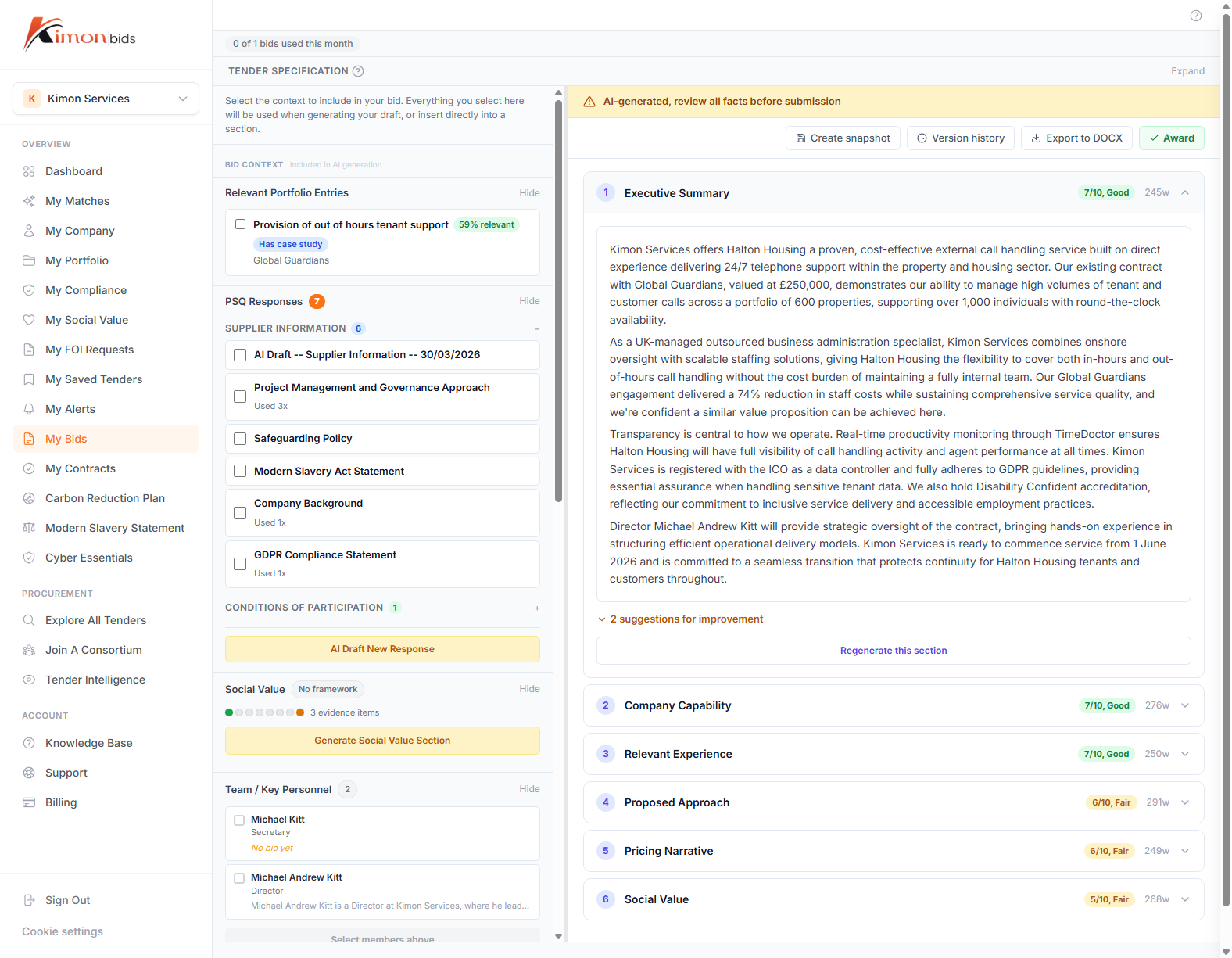
- Open the bid in the Bid Workspace
- Click Run Review in the right panel
- Select which review mode(s) to run (you can run all four at once)
- Wait for the review to complete (typically 30-60 seconds for a full bid)
- Review the output in the Results tab
You can run reviews multiple times as you revise your bid. Each run generates a new set of results. Previous results are saved and can be accessed from the review history.
Review Limitations
The AI Review is a tool to assist, not replace, human judgement. It has the following limitations:
It does not know the buyer. The review cannot access the buyer's internal scoring guidance or know which evaluator will be reading your bid. Different evaluators may weight factors differently.
It may miss context. If your bid refers to documents or information not included in the workspace, the review will not have that context. For example, if your case studies are in an attached PDF rather than the bid text, the compliance matrix may not find them.
It is not always right. The review may flag content as missing when it is present but worded differently than expected. Use your judgement on each flagged item.
It works best on complete drafts. Running the review on a partial draft will produce results but they will be less meaningful. Run the full review after completing all sections.
Best Practices
-
Write before reviewing -- Complete a full first draft before running the AI review. Reviewing incomplete sections wastes review credits and produces misleading results.
-
Run Evaluator Lens first -- This gives you the highest-value feedback on scoring improvement. Address those findings before running Red Team.
-
Use the Compliance Matrix before every submission -- Make it a mandatory step in your bid process. Missed mandatory requirements are avoidable with a systematic check.
-
Re-run after major revisions -- If you make significant changes to a section, run the review again. A passing review on an earlier draft does not guarantee the current version is equally strong.
-
Note the scoring weights -- Focus your review effort on the sections that carry the most marks. A Red issue in a 5% weighted section is less critical than an Amber issue in a 35% weighted section.