
Why Compliance Documents Matter
Government buyers require evidence of specific policies and certifications as part of the bid qualification process. Missing or expired compliance documents can result in bid disqualification, even when your technical response is strong.
KimonBids provides a compliance document library where you can store, track, and attach compliance evidence to your bids. The library tracks expiry dates and alerts you before documents need renewing.
The Compliance Dashboard
Navigate to Compliance in the main navigation to access the compliance dashboard.
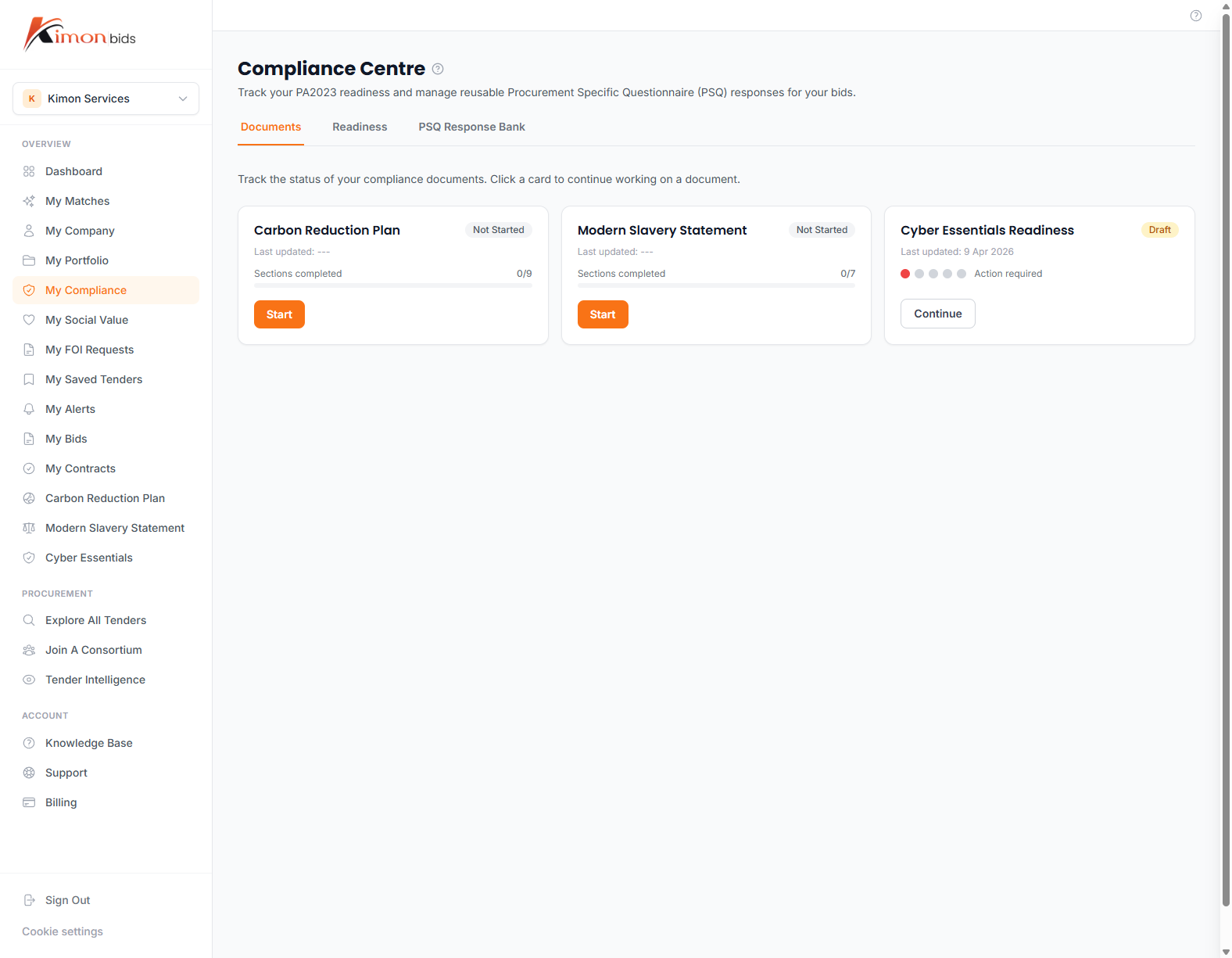
The dashboard shows:
- Document status cards -- One card per compliance area showing current status (Active, Expiring Soon, Expired, Not Started)
- Upcoming renewals -- Documents expiring in the next 90 days
- Bid attachment history -- Which bids have used each compliance document
Supported Compliance Areas
Cyber Essentials
Cyber Essentials is a government-backed certification scheme that demonstrates your organisation has implemented basic cybersecurity controls. It is mandatory for contracts involving personal data or government IT systems.
There are two levels:
- Cyber Essentials -- Self-assessed against five technical controls
- Cyber Essentials Plus -- Third-party verified (required for higher-risk contracts)
What KimonBids stores:
- Certificate number
- Certification body
- Issue date and expiry date (certificates are valid for 12 months)
- Certificate document (PDF)
To add your Cyber Essentials certificate:
- Go to Compliance and click on the Cyber Essentials card
- Click Upload Certificate
- Enter your certificate number, certification body (e.g. IASME, NCSC Assured Delivery Partner), and expiry date
- Upload the certificate PDF
- Click Save
Renewal: Cyber Essentials certificates expire annually. KimonBids will alert you 60 days before expiry so you can arrange re-certification in time. The renewal process through the IASME Consortium or another NCSC-approved body typically takes 2-4 weeks.
Carbon Reduction Plan
Under PPN 06/21, suppliers bidding for government contracts above £5 million must have a published Carbon Reduction Plan (CRP) that commits to Net Zero by 2050.
The CRP must:
- Be published on your company website (publicly accessible)
- Measure your current baseline carbon emissions across Scope 1 and Scope 2 (and ideally Scope 3)
- Include a commitment to Net Zero by 2050 in line with the UK's national target
- Be signed by a senior person in your organisation (director or equivalent)
What KimonBids stores:
- URL of your published CRP
- Date the CRP was published
- Scope of emissions covered (1, 2, 3)
- CRP document (PDF for attachment to bids where required)
To add your Carbon Reduction Plan:
- Go to Compliance and click the Carbon Reduction Plan card
- Click Add CRP Details
- Enter the URL where your CRP is published
- Upload a PDF version for bid attachment
- Enter the publication date
- Click Save
If you do not yet have a CRP: KimonBids includes a Carbon Reduction Plan generation tool. The AI-assisted generator will draft a CRP template based on your company profile that you can review, customise, and publish. Access it from the CRP card by clicking Create CRP.
Modern Slavery Statement
The Modern Slavery Act 2015 requires organisations with an annual turnover above £36 million to publish an annual Modern Slavery Statement. However, many government buyers request modern slavery statements from suppliers of all sizes as part of pre-qualification.
The statement should cover:
- Your organisation's structure and supply chains
- Policies in relation to slavery and human trafficking
- Due diligence processes
- Risk assessment and management
- Training and capacity building
- Key performance indicators
What KimonBids stores:
- Modern Slavery Statement document (PDF or Word)
- Publication date
- Period covered (financial year)
- Signatory name and role
To add your Modern Slavery Statement:
- Go to Compliance and click the Modern Slavery Statement card
- Click Upload Statement
- Upload the document and enter the publication date
- Click Save
If you do not yet have a statement: Use the KimonBids Modern Slavery Statement generator. It drafts a statement appropriate for your organisation size based on your company profile. Access it from the MSS card by clicking Create Statement.
Document Expiry Tracking
KimonBids tracks expiry dates for time-limited compliance documents and sends alerts at:
- 90 days before expiry -- Advance warning to begin renewal process
- 30 days before expiry -- Urgent reminder
- 7 days before expiry -- Final warning
- On expiry -- Document marked as expired; bids attached to this document are flagged
You can manage notification preferences in Settings.
Attaching Compliance Documents to Bids
When creating or editing a bid, you can attach compliance documents from your library:
- In the Bid Workspace, click Attachments in the right panel
- Select From Compliance Library
- Choose the relevant documents to attach
- The documents are linked to the bid and included in the export package
This avoids the need to re-upload documents for every bid. When a document is renewed (e.g. new Cyber Essentials certificate), you can update it in the compliance library and all linked bids automatically reference the latest version.
Uploading Evidence for New Certifications
If you are working towards a new certification that is not yet complete, you can track it in KimonBids as "In Progress". This lets you:
- See which certifications you are missing for upcoming bids
- Add notes on the renewal timeline
- Upload interim evidence where accepted by buyers
To mark a certification as in progress:
- Click the relevant compliance card
- Click Mark as In Progress
- Add expected completion date and any notes
- Save
Compliance and Tier Access
The full compliance document library (including AI generation tools for CRP and MSS) is available to Pro+ subscribers (Pro, Growth, and Scale). Free accounts can view compliance status but cannot upload documents or use AI generation tools.
To unlock compliance features, see Managing Your Subscription.