
What is KimonBids?
KimonBids is a procurement intelligence and bid-writing platform built for UK small and medium-sized enterprises (SMEs). It helps your business find relevant government contract opportunities, understand whether you are competitive, and write high-quality bids faster.
Government procurement is worth over £300 billion per year in the UK. Much of it is legally required to be open to SMEs. KimonBids gives your business the tools to participate more effectively -- without needing an in-house bid-writing team.
Who is KimonBids for?
KimonBids is designed for:
- Business owners and directors who want to grow revenue through public sector contracts
- Operations managers responsible for tendering without dedicated procurement staff
- Bid writers who need better research tools and AI-assisted drafting
- Compliance officers who need to maintain certifications and track submission requirements
Whether you are bidding for the first time or managing a mature public sector pipeline, KimonBids reduces the time you spend on low-value research and administration.
Key Features
Tender Intelligence
KimonBids aggregates live opportunities from multiple UK government procurement portals:
- Contracts Finder (central government and NHS)
- Find a Tender (above-threshold notices, and Welsh public sector notices since Sell2Wales merged into it)
- Public Contracts Scotland
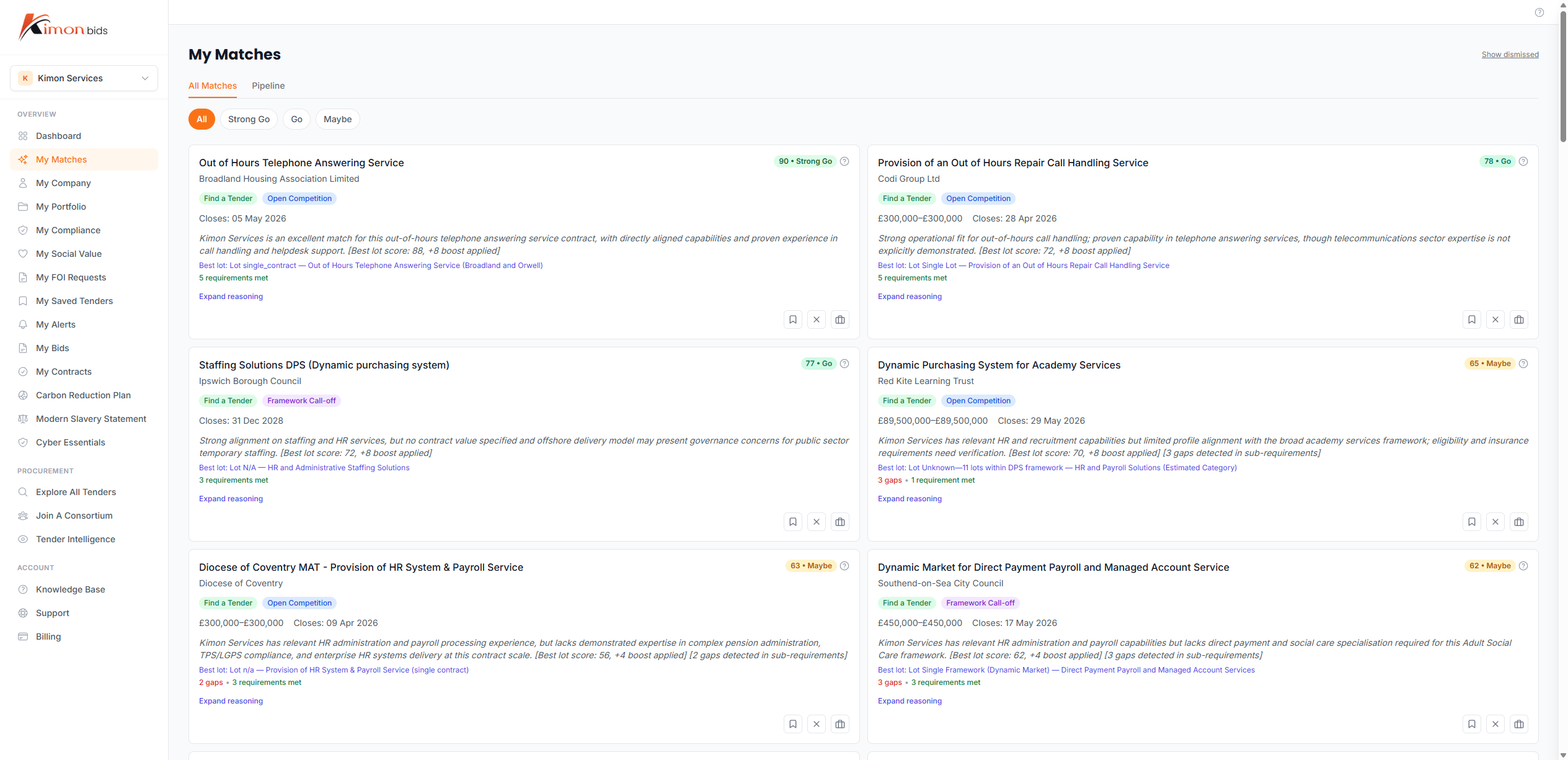
Opportunities are filtered and ranked based on your business profile -- your sectors, certifications, company size, and geographic reach. You see a personalised match score for every tender so you can prioritise the ones most worth pursuing.
Bid Workspace
Once you have identified a promising tender, the Bid Workspace lets you draft a full bid response. You can:
- Upload the ITT (Invitation to Tender) document and extract scored criteria automatically
- Generate AI-assisted draft responses for each section
- Set and track word limits per section
- Run quality reviews against your draft before submitting
The workspace keeps all bid versions in one place, linked to the original tender record.
Compliance Document Management
Many tenders require evidence of specific certifications and policies. KimonBids helps you maintain a compliance library of reusable documents:
- Cyber Essentials certification
- Carbon Reduction Plan (PPN 06/21)
- Modern Slavery Statement (Transparency in Supply Chains Act)
Documents are stored with expiry tracking and can be attached to bids at submission time.
AI Bid Reviews
Before submitting, run an AI-powered quality review on your bid. The review evaluates your response through the lens of a procurement evaluator, identifies weaknesses, and flags compliance gaps.
Reviews include:
- Evaluator lens assessment (how a buyer scores your response)
- Red team analysis (likely objections from a critical evaluator)
- Compliance matrix check (required evidence vs what you have provided)
- RAG (Red/Amber/Green) indicator per section
Getting Started: Your First Steps
Follow these steps to set up your account and find your first opportunity:
-
Complete your profile -- Add your company name, sectors, CPV codes, certifications, and a brief company description. This improves match accuracy significantly. See Setting Up Your Profile for a step-by-step guide.
-
Review your matched tenders -- Visit the Tenders page to see opportunities ranked by relevance. Use filters to narrow by sector, value, closing date, or region.
-
Save searches -- If you find a useful filter combination, save it as a search alert. KimonBids will notify you when new matching tenders appear.
-
Create your first bid -- When you find a tender worth pursuing, click "Start Bid" to open the Bid Workspace. Upload the ITT document and begin drafting.
-
Run a quality review -- Before finalising your response, use the AI review tools to identify gaps and improve your score.
Understanding Your Dashboard
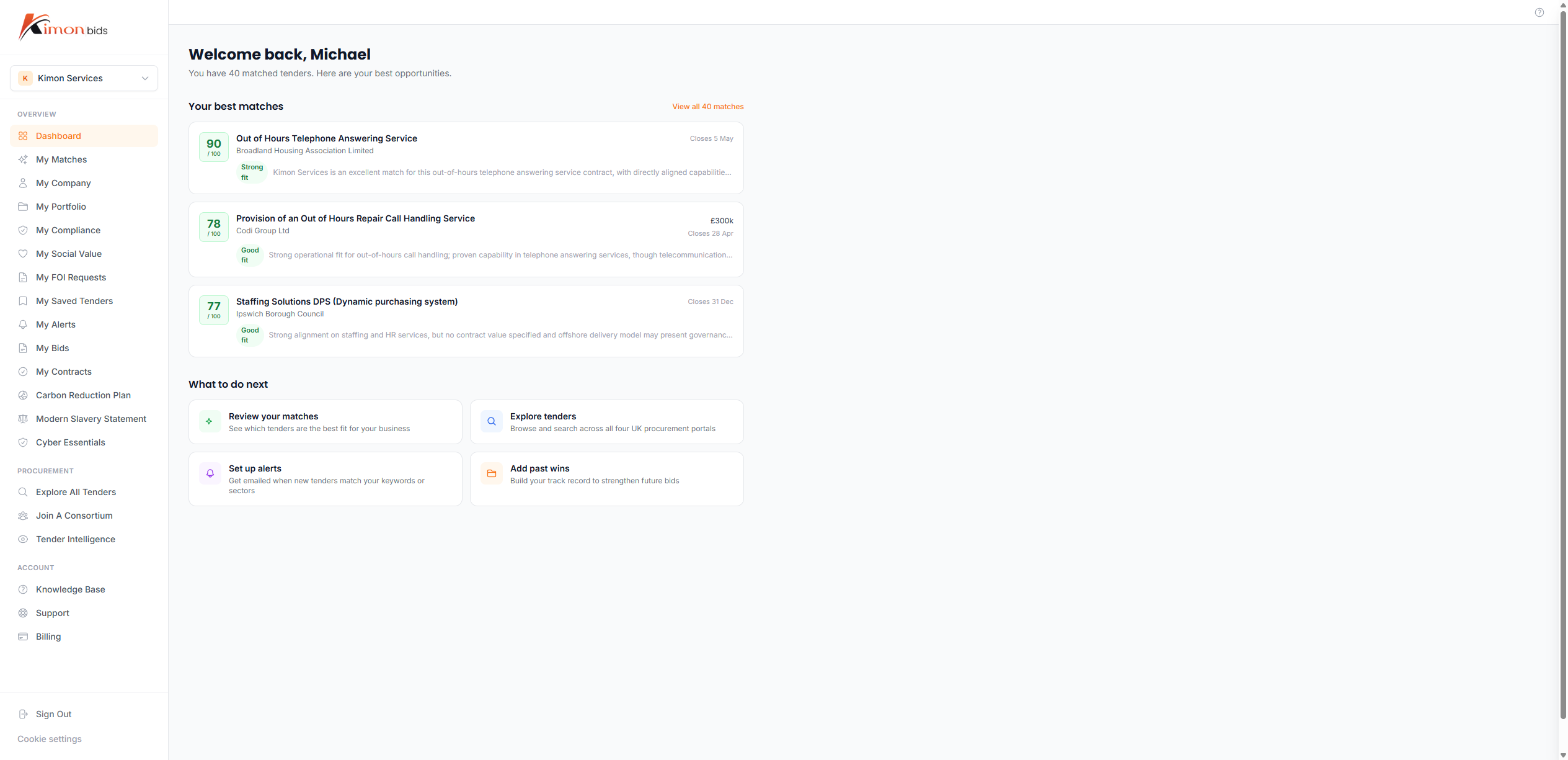
The dashboard gives you a summary of:
- Active bids -- bids in progress with upcoming deadlines
- Matched tenders -- new opportunities matching your profile this week
- Compliance status -- whether any certifications are expiring soon
- Pipeline value -- estimated contract value of your active bid pipeline
Subscription Tiers
KimonBids offers four subscription tiers:
| Feature | Free | Pro | Growth | Scale |
|---|---|---|---|---|
| Tender matching | Limited | Full | Full | Full |
| Tender search | 1 search/day, top 5 results | Unlimited | Unlimited | Unlimited |
| Bids per month | 1 (lifetime trial) | 1 | 5 | 25 |
| Tender alerts | 1 | Unlimited | Unlimited | Unlimited |
| AI reviews | Not included | Included | Included | Included |
| Compliance documents | Not included | Included | Included | Included |
| Competitor/buyer watchlist | Not included | 5 slots each | Unlimited | Unlimited |
| Team members | 1 | 3 | 5 | 10 |
See Managing Your Subscription for details on upgrading.
Getting Help
If you have questions not covered in this help centre, you can contact the KimonBids support team via the Support page in the app. Include your account email and a description of the issue.
For urgent technical problems, include any error messages or screenshots to help the support team resolve your issue quickly.